Animation files
An animation file is a MessagePack array of animation objects, one per animated view. The editor writes it, and every runtime reads the same format — from the app bundle in SwiftUI, over HTTP in React, and over the editor's socket in all three.
The file is binary, so what follows is the same document written out as JSON. The field names, types and nesting are exactly what MessagePack carries; only the bytes differ.
[
  {
    "id": "card0",
    "invokeType": "trigger",
    "initialValues": {
      "scale": 1,
      "translate": [0, 0],
      "rotate": 0,
      "rotateCenter": 0,
      "opacity": 1
    },
    "keyframes": [
      {
        "id": "1A9DA10A-9E90-49B6-943B-D10756FA3C2C",
        "duration": 0,
        "values": {
          "scale": 1,
          "translate": [-0.648, -0.003],
          "rotate": 0,
          "rotateCenter": 0,
          "opacity": 1
        }
      },
      {
        "id": "F5F9E292-E987-442C-89CC-C2CB09B56971",
        "duration": 3,
        "values": {
          "scale": 1,
          "translate": [0.008, -0.012],
          "rotate": 0,
          "rotateCenter": 0,
          "opacity": 1
        }
      }
    ]
  }
]
Animation object
| Field | Type | Meaning |
|---|---|---|
id |
string | Matches the id the animated view was tagged with — .inertia("card0"), Inertia(id = "card0"), <Inertia id="card0">. |
initialValues |
object | The pose the view sits at before the animation runs. |
invokeType |
"auto" | "trigger" |
Whether it plays as soon as its schema arrives, or waits to be triggered. |
keyframes |
array | The poses to animate through, in order. |
shapes |
array | Vectors drawn against this view — empty on an animation with nothing drawn on it, and absent in files written before shapes existed. See Shape object. |
invokeType is not honoured on every runtime
Compose and React start an "auto" animation as soon as they hold its schema. The
SwiftUI runtime stores the field and ignores it — an "auto" track on iOS still waits
for trigger(_:). See Triggering animations.
Keyframe object
| Field | Type | Meaning |
|---|---|---|
id |
string | Unique within the track. The editor writes UUIDs. |
duration |
number | Seconds to reach this keyframe from the previous one. |
values |
object | The pose at this keyframe. |
duration is relative
This is the part of the format that surprises people. duration is not a timestamp and
not the length of the whole animation — it is the time taken to travel from the preceding
keyframe to this one.
So a track with durations 0, 1, 2 has keyframes at absolute times 0s, 1s, and 3s.

A leading keyframe with duration: 0 is therefore a starting pose that takes no time to
reach, not a keyframe that waits.
Non-positive durations are repaired, not honoured
Interpolation divides by the keyframe's duration, so the runtime rewrites any
duration that is zero, negative or non-finite to 1ms before playing the track. That
keeps a hand-edited file from producing NaN and a view that vanishes, but the
keyframe reads as an instant jump, and every keyframe after it lands 1ms later than
the file implies. The editor keeps its own durations above the same minimum.
A leading keyframe at duration: 0 is the normal case and behaves as intended: the
view is at its starting pose 1ms in, which is not something you can see.
values
Every keyframe carries all five values — there is no notion of animating only one property and leaving the others alone. See Animatable values.
Shape object
An animation may carry vectors drawn against its view — see Drawing
vectors. They ride in the same file, under the animation's shapes
key, and every runtime rasterizes them itself.
{
  "id": "card0",
  "invokeType": "auto",
  "initialValues": { "scale": 1, "translate": [0, 0], "rotate": 0, "rotateCenter": 0, "opacity": 1 },
  "keyframes": [],
  "shapes": [
    {
      "id": "B4E1C0F2-6C3E-4B0E-9E2C-6A0F1D2E3F44",
      "zIndex": 0,
      "position": "bottom",
      "ownCanvas": false,
      "transforms": { "scale": 1, "translate": [0.25, 0], "rotate": 0, "rotateCenter": 0, "opacity": 1 },
      "shape": {
        "id": "1F7A9C55-1D2B-4E6A-8C1F-7B3D9E0A5C21",
        "type": "circle",
        "width": 0.5,
        "height": 0.5,
        "fill": { "red": 0.33, "green": 0.35, "blue": 0.86, "alpha": 1 },
        "strokeWidth": 0
      },
      "shapes": [
        {
          "id": "9D2E4A17-88C0-4F3B-B5A9-0C6E1D7F2A38",
          "zIndex": 0,
          "shape": {
            "id": "C3B6E5D4-2A19-4870-9FE1-5B4C8D3A2E60",
            "type": "circle",
            "width": 0.3,
            "height": 0.3,
            "fill": { "red": 1, "green": 1, "blue": 1, "alpha": 1 }
          }
        }
      ]
    }
  ]
}
| Field | Type | Default when absent | Meaning |
|---|---|---|---|
id |
string | — | Unique within the animation. What the editor's selection points at. |
shape |
object | none | The vector description. See below. |
vertices |
array | none | Corners authored one by one, as an alternative to shape. The editor does not write these. |
zIndex |
int | 0 |
Order among its siblings — higher draws in front. Ties keep file order. |
position |
"bottom" | "top" |
"bottom" |
Behind the view's content, or over it. |
ownCanvas |
bool | false |
Whether the shape gets a rendering layer to itself. |
showsBeforeAnimation |
bool | true |
Whether the shape is drawn while the animation waits to play, or only once it is playing. See When a shape is drawn. |
transforms |
object | identity pose | Where the shape sits in whatever holds it — the same five values a keyframe carries, with translate in the units the shape is sized in. |
animation |
object | none | A track of the shape's own, in exactly the format of the animation object above. |
shapes |
array | [] |
Shapes drawn inside this one, sized in multiples of its shorter side. |
shape
| Field | Type | Default when absent | Meaning |
|---|---|---|---|
id |
string | — | Identifies the description. |
type |
"rectangle" | "square" | "circle" | "oval" | "triangle" |
— | Which vector it draws as. |
width, height |
number | — | In multiples of the view's shorter side — one length across and down alike, so a circle of 1 is round on a view of any proportion. |
fill |
colour | none | Floods the outline. Absent is a shape that is only its outline. |
stroke |
colour | none | The outline itself. Draws nothing without a strokeWidth. |
strokeWidth |
number | 0 |
Outline thickness, in the same units as the size, drawn inside the outline. Held at half the shape's smaller side. |
A colour is four 0–1 floats: { "red": …, "green": …, "blue": …, "alpha": … }, in sRGB.
A shape with neither fill nor stroke draws nothing at all.
zIndex and position order siblings, and only siblings
A z-index orders the shapes it shares a list with — the ones on the same view, or the
ones inside the same parent — and position picks which side of the view's content
that whole stack is drawn on. Neither reaches across those lines: a nested shape is
part of its parent's drawing, so no number on it lifts it out from behind a shape its
parent sits behind, and nothing drawn behind a view can be raised in front of it by
counting higher. All three runtimes read both fields the same way — see
Choosing a runtime.
Coordinates
Everything about a shape is measured in multiples of the shorter side of the view it is
authored against — sizes, stroke widths and the translation in transforms alike — with the
origin at that view's centre. A shape's coordinates are not clipped to its view: values past
the view's edge go on being drawn, because the canvas belongs to the container.
Inside a nested shape, the unit is the parent shape's shorter side rather than the view's.
Shapes and tracks
A shape's animation is a full animation object, played on the same clock as everything
else in the container, so a drawing moves in time with the view it was authored beside. A
shape carrying one is drawn on a rendering layer of its own, which is what lets it move
without dragging its neighbours along.
transforms is not a track. It is where the shape is drawn before anything plays — baked
into the geometry the renderer is handed, the same at every point on the timeline — and an
animation plays on top of it. It is also the only thing that moves a nested shape, which
has no layer of its own and so ignores an animation of its own if one is written by hand.
When a shape is drawn
showsBeforeAnimation says whether a shape is backdrop or part of the run. true — which
is what an absent key means — is backdrop: the shape is drawn from the moment the view it
belongs to is on screen, whether or not anything has been triggered. false keeps it off
screen until the run is, and it appears with the animation.
It is read on the shapes an animation holds directly. A nested shape is drawn into its parent's vertex buffer, so it appears and disappears with whatever it is drawn inside of and its own value is never consulted. All three runtimes honour the field.
Backwards compatibility
Every field above except id is optional on the wire, and each absent one means what shapes
did before it existed: no z-index is the bottom of the stack in file order, no position is
a backdrop, no ownCanvas is a shared layer, no showsBeforeAnimation is a shape drawn
whether or not anything is playing, no transforms is drawn exactly where the corners say,
no shapes is nothing nested inside. A file written before any of this reads back
unchanged.
Loop length
The file does not record how long the loop is. At runtime the loop is
where loopDuration starts at the runtime default of 3 seconds and changes only when
the editor sends a new timeline length, or — on SwiftUI, which is the runtime that exposes
it to the app — when your app sets inertia.loopDuration. A track
shorter than the loop holds its final pose until the loop comes around; a track longer
than loopDuration stretches the loop for every track, so they all still restart
together.
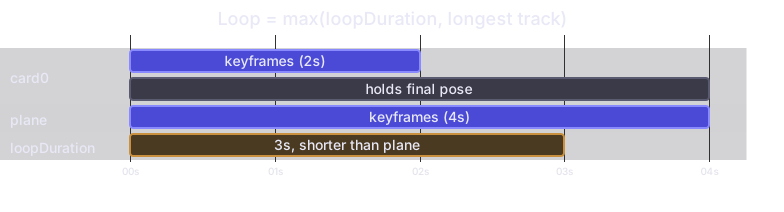
So an animation authored on a 5-second timeline plays back over a 5-second loop only if one of its tracks actually runs the full 5 seconds. If the longest ends at 4 seconds the loop is 4 seconds; if it ends at 2 seconds the loop falls back to the 3-second default. Either keep the editor's loop duration at 3 seconds, or set the loop duration in your app to the length you authored against — which today only the SwiftUI runtime lets you do.
Naming and lookup
The container's id is the file's name. One file holds every animation for that container.
InertiaContainer(id: "animation", …) loads animation.inertia from the app bundle.
Outside editor mode the file must exist and must decode — the container reads it during initialization and traps if it cannot. An empty array is a valid file; a missing one is a crash.
There is no lookup. The Compose container never loads an animation file for itself — schemas only ever arrive from the editor over the socket, addressed to the container id. See Choosing a runtime.
<InertiaContainer id="animation" baseURL="http://localhost:8000"> fetches
http://localhost:8000/animation.inertia.
A failed fetch is logged and otherwise ignored, so a missing file leaves every tagged view at its initial pose rather than crashing. The server needs CORS headers if it is not the same origin as your page.