Triggering animations
An Inertia animation does not start on its own. The runtime plays a view's track once two things are true: the container's clock is running, and that view's id has been triggered. Both come from one call.

Triggering from your app
Reach the container's playback handle and call trigger with the same id you tagged the
view with:
struct ContentView: View {
    @Environment(\.inertiaDataModel) private var inertia: InertiaDataModel!

    var body: some View {
        VStack(spacing: 24) {
            RoundedRectangle(cornerRadius: 12)
                .fill(.blue)
                .frame(width: 200, height: 120)
                .inertia("card0")

            Button("Animate") {
                inertia.trigger("card0")
            }
        }
    }
}
The environment value is only populated inside an InertiaContainer — it is nil
anywhere else, which is why the force-unwrapped type above is safe in practice and
crashes loudly if you put the view outside a container.
@Composable
fun ContentView() {
    val inertia = LocalInertia.current

    Column(verticalArrangement = Arrangement.spacedBy(24.dp)) {
        Inertia(id = "card0") {
            Box(Modifier.size(200.dp, 120.dp).background(Color.Blue))
        }

        Button(onClick = { inertia.trigger("card0") }) {
            Text("Animate")
        }
    }
}
LocalInertia has no default — reading it outside an InertiaContainer throws with
"LocalInertia was read outside of an InertiaContainer."
function ContentView() {
  const inertia = useInertia();

  return (
    <div>
      <Inertia id="card0">
        <div style={{ width: 200, height: 120, background: "blue" }} />
      </Inertia>

      <button onClick={() => inertia.trigger("card0")}>Animate</button>
    </div>
  );
}
useInertia throws "useInertia must be used within an InertiaContainer" if there is
no container above it.
Playing on appear
There is no declarative "play on appear". Trigger it yourself:
invokeType in the file
Animation files carry an invokeType of "auto" or "trigger". The SwiftUI
runtime stores it but does not act on it: a track with "auto" still waits for
trigger(_:). Treat the field as metadata the editor round-trips, and drive
playback from your own code.
An animation whose invokeType is "auto" starts as soon as the runtime holds its
schema — you do not have to trigger it.
For a "trigger" animation, do it yourself:
invokeType: auto is not honoured everywhere
Compose and React start auto animations for you. SwiftUI does not — it stores
the field and ignores it. An animation authored as auto and shipped on iOS still
needs a trigger(_:) call.
Triggering several views together
Each id is triggered separately, but they share one clock, so triggering them in the same turn starts them together:
While repeating, every track is padded to the loop length, so tracks of different lengths still restart in step with each other.
Stopping and restarting
trigger does not reset a track that is already playing — a trigger arriving mid-run
joins the run in progress.
inertia.cancel("card0")   // back to initialValues, and stays there
inertia.restart("card0")  // clears the cancel and plays from the top
inertia.isCancelled("card0")
restart rewinds the shared clock, so it starts every animation in the container
over, not just this one. That is the same shared clock that makes a mid-run trigger
join the run in progress.
pause, seek and resume also exist, but only the editor can reach them.
inertia.cancel("card0")   // back to initialValues, and stays there
inertia.restart("card0")  // clears the cancel and plays from the top
inertia.isCancelled("card0")
restart rewinds the shared clock, so it starts every animation in the container
over, not just this one. That is the same shared clock that makes a mid-run trigger
join the run in progress.
inertia.cancel("card0");   // back to initialValues, and stays there
inertia.restart("card0");  // clears the cancel and plays from the top
inertia.isCancelled("card0");
restart rewinds the shared clock, so it starts every animation in the container
over, not just this one. That is the same shared clock that makes a mid-run trigger
join the run in progress.
Repeating
Animations repeat by default. Turn it off:
With repeating off, each track plays its own keyframes once and stops on its final pose. With it on, tracks are held out to the full loop duration and start over together.
Loop duration
Assigning to loopDuration does not clamp — the property takes whatever you give
it, including a value outside the usable range. Only the editor's timeline messages
are clamped on the way in. Run your own values through the same helper if they come
from somewhere you do not control:
InertiaPlayback exposes the same constants the editor uses:
Assigning does not clamp, the same as on SwiftUI. Run untrusted values through the helper yourself:
Assigning does not clamp, the same as on SwiftUI. The constants live on
InertiaPlayback in inertia-base:
Whichever runtime you are on, the editor overwrites loopDuration whenever its timeline is
resized — so a value you set before attaching the editor will be replaced by the one the
timeline shows.
The loop the runtime actually plays is max(loopDuration, longest track) on every
runtime, so a track longer than the loop stretches it rather than being cut off.
Triggering in editor mode
This is one of the sharper differences between the runtimes.
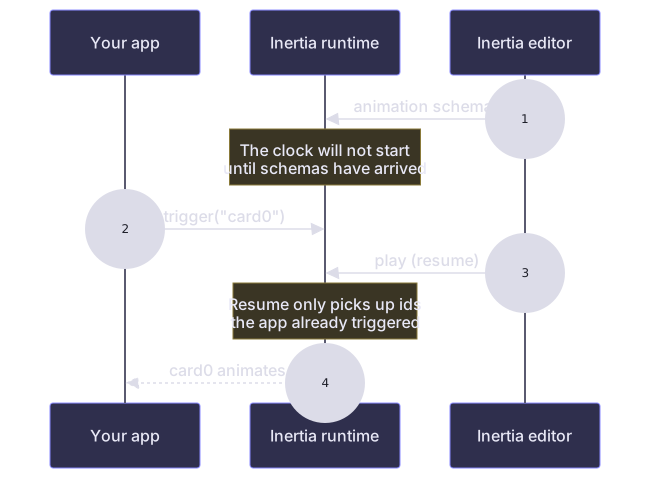
The editor's transport does not trigger anything. Its play button pushes the current schemas and sends a resume, and resume deliberately only picks up actionables your app has already triggered — starting one is the app's call, not the editor's.
So a view that is never triggered stays still in the editor too, however many times
you press play. Give the app a way to trigger while you are authoring — a button, or
an .onAppear — or you will be recording against a view that never moves.
For the same reason, trigger(_:) in editor mode does nothing until the editor has
sent its schemas: the clock will not start while the container has no animations
loaded, which in editor mode it does not until an editor attaches.
The editor's play button starts every registered animation, whatever its
invokeType. Authoring a trigger animation is exactly the moment nothing is going
to call trigger for it, so the editor stands in for the app.
You therefore do not need a trigger button in the app just to author against it — though one is still useful for checking how the animation reads on a real interaction.
Signals only ever come from the editor, so the same animation running with no editor attached still waits for its trigger.
The editor's play button starts every animation whose schema the runtime holds,
whatever its invokeType. Authoring a trigger animation is exactly the moment
nothing is going to call trigger for it, so the editor stands in for the app.
You therefore do not need a trigger button in the app just to author against it — though one is still useful for checking how the animation reads on a real interaction.
Signals only ever come from the editor, so the same animation running with no editor attached still waits for its trigger.
What triggering does not do
trigger sets a view's track running, clears any frame the editor has the playhead parked
on, and starts the container's clock. It does not reset a track that is already playing —
on Compose and React that is what restart is for, and on SwiftUI there is no equivalent.